Ever wondered how your favorite video games are made or how you can start creating your own, you’ve come to the right place. In this Game Design 101 guide, I’ll walk you through the essential concepts of game design and give you a clear, actionable roadmap to start designing your first game.
Interested in creating indie games or dreaming of working in the gaming industry? Understanding the fundamentals of game design is the first step.
What is Game Design and Why Does it Matter?
At its core, game design is the process of creating the rules, mechanics, storylines, characters, and levels that make a game fun and engaging. Game designers are responsible for the overall experience a player has while interacting with a game. This includes everything from game mechanics (how the game works) to narrative design (the story told within the game).
The Importance of Game Design
Good game design can make the difference between a game that’s enjoyable and one that’s frustrating or boring. Whether you’re designing a mobile app, a PC game, or an immersive VR experience, understanding game mechanics, player psychology, and story arcs is key to building an unforgettable experience.
Key Elements of Game Design
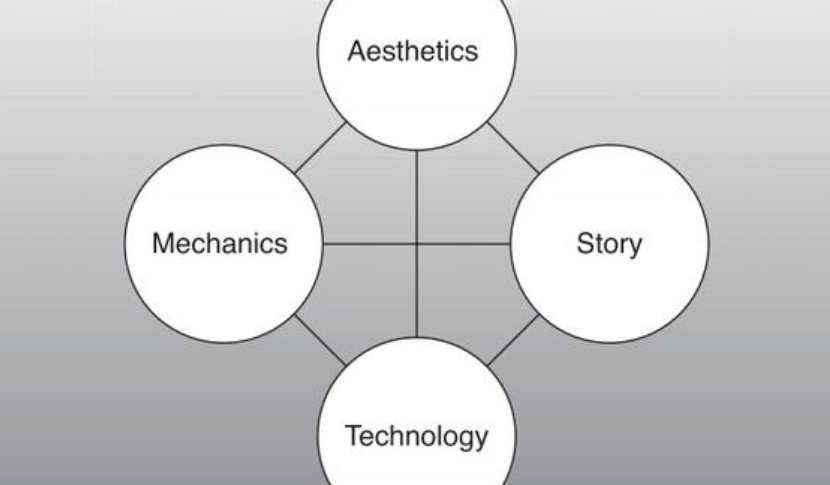 Image credits – Intechopen
Now that we understand what game design is, let’s dive into the essential elements you need to master to create a successful game.
1. Game Mechanics: The Heart of Gameplay
Game mechanics define the rules and systems that make a game function. These include things like movement, combat, progression, and puzzles. As a designer, it’s essential to ask questions like:
- How does the player interact with the world? (e.g., controls, objects)
- What are the primary goals of the game? (e.g., defeating enemies, solving puzzles)
- What obstacles will the player face? (e.g., limited resources, time constraints)
Great game mechanics create a sense of engagement and challenge without frustrating the player.
2. User Experience (UX) and Interface Design
User experience (UX) refers to how the player feels while interacting with the game, and UI design (user interface) determines how the game presents information. As a game designer, you’ll want to ensure that the controls are intuitive and that the interface clearly communicates important information (health, objectives, inventory).
For example, think about the HUD (heads-up display) in action games—it’s the UI that shows you things like health, weapons, and game objectives. An effective HUD design makes the game more enjoyable because it lets players focus on the action instead of struggling with confusing controls.
3. Level Design: Crafting the Player’s Journey
Level design refers to the creation of the stages or environments within a game. Each level should offer new challenges and keep players engaged. The flow of levels should be balanced to prevent the game from feeling too easy or too difficult.
- Challenge progression: As players advance, the difficulty should gradually increase, introducing more complex mechanics and obstacles.
- Pacing: The pacing of levels should balance action and downtime, offering players a break in between high-intensity moments.
4. Narrative Design: Telling a Compelling Story
A good story can make a game memorable, and narrative design is the art of creating an engaging storyline. Whether you’re designing a linear story or a branching narrative with player choices, the story should always serve the game’s core mechanics and world-building.
Key elements of narrative design:
- Character development: Players should care about the characters they control and interact with.
- World-building: The game’s world should feel immersive and consistent, offering a rich environment for the player to explore.
- Motivation: Players should understand why they’re doing what they’re doing in the game (e.g., defeating a villain, solving mysteries).
How to Get Started in Game Design
 Image credits – Visual space
Creating a game might sound intimidating, but it’s absolutely possible to start small and build your skills over time. Here are a few steps you can take to begin your game design journey:
1. Learn the Basics of Game Engines
A game engine is the software used to build games. There are several game engines available for beginners, such as Unity and Unreal Engine. These platforms provide a range of tools for building both 2D and 3D games.
- Unity is great for beginners and has a massive community. It’s ideal for mobile, indie, and VR games.
- Unreal Engine offers more powerful tools for high-quality graphics and large-scale games, making it a good choice for 3D games.
2. Start with a Small Project
Don’t jump into creating an epic RPG right away. Instead, start small with a basic 2D game or a simple puzzle game. This will help you understand the mechanics of game development without overwhelming yourself.
3. Practice and Iterate
Game design is an iterative process. Create prototypes, test them with players, and use their feedback to improve your design. The more you practice, the better you’ll get at balancing mechanics, design, and story.
4. Join a Game Design Community
Game design communities are a great place to learn from others and get feedback on your work. Join forums, Reddit communities, or social media groups to connect with other aspiring game designers.
Common Mistakes New Game Designers Make
1. Overcomplicating the Game Mechanics
As a beginner, it’s tempting to make your game complex. But simplicity is key to engaging gameplay. Start with basic mechanics, and make sure they’re polished before adding extra layers of complexity.
2. Ignoring Playtesting
Playtesting is critical for discovering flaws in your design. It’s easy to get attached to your game, but it’s essential to gather feedback from others. You might think your game is fun, but players may experience it differently.
3. Neglecting the Learning Curve
Your game should be easy for new players to pick up. If players are overwhelmed by difficult mechanics or confusing controls, they’ll abandon your game early. Always keep the learning curve in mind when designing levels and mechanics.
Frequently Asked Questions (FAQs)
1. Do I need to know how to code to become a game designer?
No, you don’t have to be a coding expert to get started. Many game design engines, like Unity or GameMaker Studio, offer visual scripting tools that allow you to design games without writing complex code. However, learning basic programming can be helpful.
2. How long does it take to design a game?
It depends on the scope and complexity of your game. A small mobile game could take a few months, while larger projects may take years. Start small, and you can always expand your game over time.
3. What is the best game design engine for beginners?
Unity is often recommended for beginners because it’s versatile, has a large community, and offers plenty of resources to learn from. Godot is another great open-source option for beginners interested in 2D games.
4. What skills are needed to become a game designer?
To become a game designer, you’ll need creativity, problem-solving skills, knowledge of game engines (like Unity or Unreal Engine), basic coding knowledge, and the ability to collaborate with a team. These skills will help you create engaging and functional games.
Final Thoughts
Game design is a fascinating and rewarding field, but it’s also a journey that requires patience, practice, and passion. Start small, focus on mastering the fundamentals, and keep iterating on your ideas. With the right tools, a solid understanding of game mechanics, and a bit of creativity, you can create games that engage players and stand the test of time.

Ryo Nakamura
View More PostsRyo Nakamura covers gaming news, updates, and industry trends. His writing keeps the community informed about new releases, patches, and competitive shifts, offering clear context and insight into how changes impact gameplay and the broader gaming landscape.